Video calls
The best webcam position for video calls (for every desk setup)
Where to put your webcam on a laptop, a laptop with a monitor or 2 screens, plus how high, how far, and how to check it in 2 minutes.
By Abhijeet Naik · · 8 min read
The best webcam position for video calls is straight in front of you, with the lens at eye level or a little above, about an arm's length away. Put it on the screen you look at most. Then keep the things you look at, like faces and notes, close to it. That's the whole rule.
The rest of this post shows how to get there with the setup you already have: a laptop, a laptop with a monitor, or 2 screens. You don't need to buy anything for most of it. A stack of books and 2 minutes with your camera preview will do.
Where should your webcam be? The quick answer
| What | Best position | Why |
|---|---|---|
| Height | Lens at eye level, or slightly above | People see you straight on, not from below |
| Left to right | Centered on you, on the screen with the call | You look at the person, not past them |
| Distance | About an arm's length | Your head and shoulders fit, and glances look smaller |
| Tilt | Level, or pointing very slightly down | No ceiling, no view up your chin |
| Screen | On top of the screen you look at most | Your eyes stay near the lens |
If you only fix one thing, fix the height. If you fix two, make sure the camera sits on the same screen as the call.
How high should your webcam be?
Eye level is the target. Sit the way you normally sit on a call and look straight ahead. The lens should be right there, or slightly above.
Here's what goes wrong at other heights:
- Too low. This is the laptop on a desk problem. The camera looks up at your chin and the ceiling, and you seem to look down at everyone.
- Too high. People see the top of your head, and you look small and far away. A little above eye level is fine. A lot above is not.
- Tilted the wrong way. After you raise a laptop, tilt the screen until the lens points at your face, not at your chest or the wall behind you.
How to raise it:
- Laptop: put it on a laptop stand, a sturdy box or a stack of books. Use an external keyboard and mouse if you need to type during the call.
- External webcam: clip it on top of the monitor, in the center. If the monitor itself is low, raise the monitor, not just the camera.
- Standing desk: set the desk height first, then check the camera. A laptop at eye level when you sit will be far below your eyes when you stand.
How far should you sit from your webcam?
About an arm's length, which is around 60 cm (2 feet) for most adults. Your head and the top of your shoulders should fit, with a little space above your head.
Distance matters for eye contact, not just framing. When you look at faces on the screen, your eyes point a little below the lens. The closer you sit, the bigger that angle gets. Here's the simple math for faces that sit 15 cm (6 inches) below the lens:
| How far you sit | How far below the lens your eyes point |
|---|---|
| 40 cm (16 inches) | about 21 degrees |
| 60 cm (24 inches) | about 14 degrees |
| 80 cm (31 inches) | about 11 degrees |
You don't need to measure anything. Just know that leaning in toward the screen makes every look down more obvious. Sitting back a little makes it smaller. Very close to a small webcam lens, your face can also look stretched.
Best webcam position for your setup
The rules are the same everywhere, but each desk has its own trap.
A laptop on its own
The webcam is built into the top of the screen, so its position is fixed. You can only change height, tilt and distance.
- Raise the laptop until the lens is at eye level.
- Tilt the screen so the lens points at your face.
- Move the call window to the top of the screen, right under the camera.
A laptop with an external monitor
This is where most people go wrong. You look at the big monitor the whole call, while the laptop camera films you from below and from the side. Pick one of these:
- Put an external webcam on top of the monitor, and put the call on that monitor. This is the best option if the monitor is where you look.
- Use the laptop camera and put the call on the laptop screen. Raise the laptop next to the monitor so its camera is near eye level.
The one thing to avoid is the camera on one screen and the call on another. Your face will look turned away the whole time.
Two monitors
- If you mostly look at one screen, put the webcam on top of that screen, in the center. Keep the call and your notes on it too.
- If you use both screens equally, put the camera between them at eye level, on a small stand or tripod in the gap. Then drag the call window to the inner edge of a screen, right beside the camera.
- Don't put the camera on the spare screen. If the call is on the left monitor and the camera is on the right one, you'll look like you're watching something off to the side.
An ultrawide monitor
Put the camera at the top center. Keep the call window in the middle and near the top, not at one end. An ultrawide screen is so wide that a window at the far edge pulls your eyes well away from the lens.
Where to put the call window and your notes
Your webcam position is only half of it. The other half is where your eyes go once the call starts. Everything you look at should sit close to the lens.
- The call window: make it smaller and drag it to the top of the screen, right under the camera.
- Your notes: keep them short, and put them near the top too. Notes at the bottom of the screen, on paper or on a second monitor pull your eyes far from the lens.
- When you share your screen: anything on that screen gets shared, including notes at the top. Share a single window instead, or use a notes tool that stays out of the share.
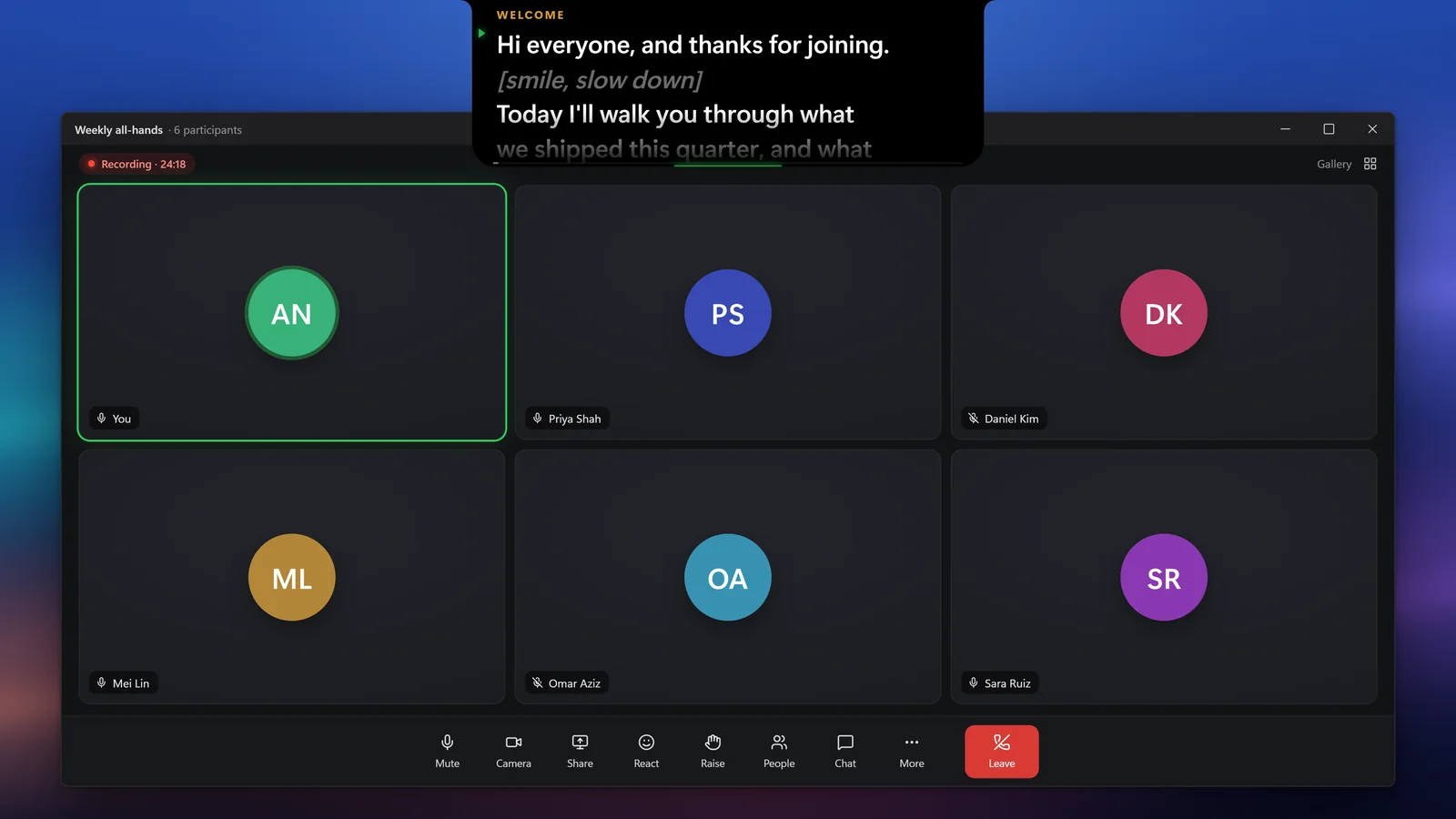
If you read a lot on calls, Lenslines puts your script in a small black notch at the top of your Windows screen, right under the webcam. It opens on the screen your webcam is on: the laptop screen for a built-in camera, the main display for an external one. It scrolls while you talk and waits when you pause. It's hidden from screen shares and recordings in apps that use Windows' standard capture. It costs $9.99 once on the Microsoft Store.
For more on where to look during a call, see our guide on keeping eye contact on video calls.
Lenslines runs on Windows PCs. On your phone? Send yourself the link.
How to check your webcam position in 2 minutes
- Open a camera preview. In Windows 11, go to Start, Settings, Bluetooth & devices, Cameras, and pick your camera. Microsoft's page on camera settings explains what you'll see there. The video settings in your call app work too.
- Sit the way you sit on a call. Don't lean in for the test.
- Check the height. The lens should be level with your eyes, and you shouldn't see much ceiling.
- Check the framing. Head and the top of your shoulders, with a little space above your head.
- Check the jump. Look at the spot where the call window will be, then at the lens. If the jump feels big, move the window closer to the camera or sit back a little.
- Record a short test. Use the Windows Camera app to record 20 seconds of yourself reading a few lines. Watch it back with the sound off and watch only your eyes.
Some webcams also show zoom, pan and tilt sliders on that Windows settings page. If yours does, you can fine tune the framing there instead of moving the camera. Microsoft says changes on that page become the default the next time an app opens the camera.
Once the camera is in the right place, light is the next thing to fix. Our post on how to look good on Zoom covers light, background and Zoom's own video settings.
Frequently asked questions
Should a webcam be at eye level?
Yes. At eye level, or a little above, people see you straight on, the way they would across a table. A camera below your eyes looks up at your chin and makes you seem to look down at everyone. A camera far above you makes you look small and distant.
Where should I put my webcam with two monitors?
On top of the screen you look at most, in the center, with the call on that same screen. If you use both screens equally, put the camera between them at eye level on a small stand. Then drag the call window to the edge closest to the camera.
How far should I sit from my webcam?
About an arm's length, around 60 cm or 2 feet for most people. That fits your head and shoulders in the frame and makes glances at the screen less obvious. Sitting very close can stretch your face and makes every look down more visible.
Is it better to have the webcam above or below the monitor?
Above, for almost everyone. A camera below the screen looks up at you, so people see your chin and the ceiling. If you have to put it below, sit back a little and keep the call window near the bottom edge of the screen, close to the camera.
Why does my laptop camera make me look bad?
Usually because it sits too low. A laptop flat on a desk puts the lens below your chin, so it films you from underneath. Raise the laptop to eye level on a stand or books, tilt the screen so the lens points at your face, and sit facing a window or lamp.